How to Learn Python for Beginners: A Step-by-Step Path
Learning how to learn Python for beginners is easier than most people expect, because Python was designed to read almost like plain English. You do not need a computer science degree, expensive software, or years of maths to get started. You need a computer, a free copy of Python, a clear plan, and a habit of writing a little code every day. This guide gives you that plan, from installing Python to building your first real projects.
Python is the most popular first programming language in the world for a good reason. It is used for websites, data analysis, automation, artificial intelligence, and scientific research, which means the time you spend learning it opens doors in many different careers. But beginners often stall for the same reasons: they watch too many tutorials without writing code, they jump between courses, or they try to learn everything at once. The path below avoids those traps by keeping you focused on one small step at a time.
Table of Contents
Quick Answer
To learn Python for beginners, install Python from python.org, pick one beginner course or book, and study the basics in this order: variables and data types, conditions, loops, functions, lists and dictionaries, then files and error handling. Write code every day, even if only for 30 minutes, and build a small project after every new concept. Finish with three portfolio projects — a calculator or quiz game, a to-do list app, and a data project — and keep practising with free resources such as the official Python tutorial and free online courses. Most beginners who practise daily can write useful programs within two to three months.
Why Python Is a Good First Language
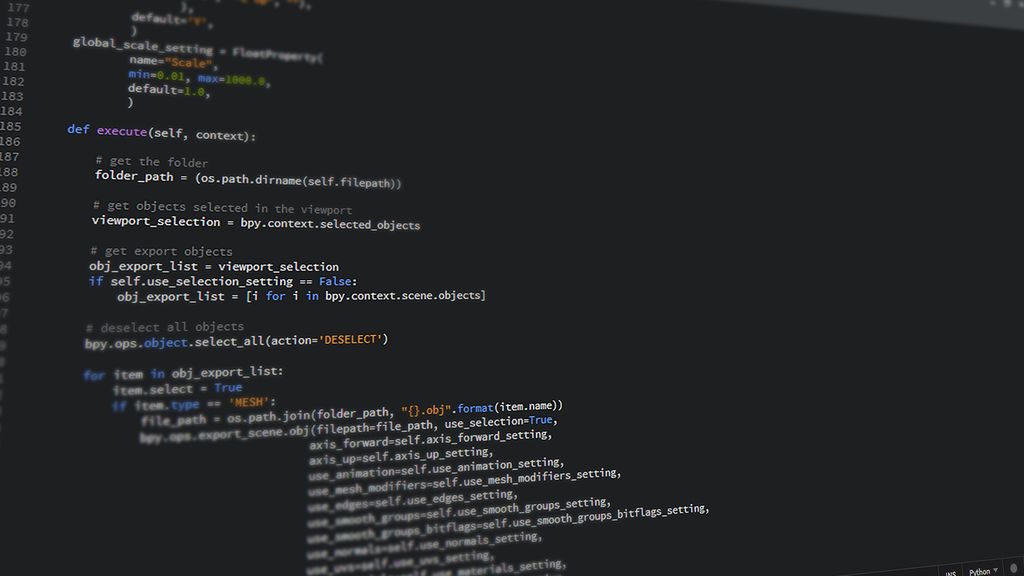
Python is a good first language because its syntax is simple and forgiving. Compare a line that prints a greeting: in Python it is print("Hello, world"), one short line that does exactly what it says. In many other languages the same task needs several lines of setup code before you see any result. That simplicity matters when you are learning, because it lets you focus on thinking like a programmer — breaking problems into steps — instead of fighting with complicated grammar.
Python is also genuinely useful in the real world, which keeps motivation high. It is the main language for data analysis and machine learning, a common choice for web development, and the go-to language for automating boring office tasks such as renaming hundreds of files or pulling data from spreadsheets. When you learn Python, you are not learning a toy language for the classroom; you are learning a skill that employers in the United States and Europe actively hire for. Check current job demand on official labour market pages such as the U.S. Bureau of Labor Statistics before choosing a career direction, and treat any salary figure you see online as something to verify rather than a promise. That demand is one reason so many people search for how to learn Python for beginners before choosing a first language.
Another advantage is the size of the Python community. If you get stuck, someone has almost certainly asked your question before, and the answer is usually a quick search away. Python also has a huge library of free ready-made tools, called packages, that let you do advanced things — charts, web scraping, spreadsheets, machine learning — without writing everything from scratch. That ecosystem is one reason Python shows up in so many job descriptions.
That said, Python is not magic. It will not teach itself to you, and watching videos without typing code will not make you a programmer. Learning to code is a practical skill, like learning an instrument: you mprove by doing, not by watching other people do it. Keep that in mind as you follow the steps below, and you will avoid the most common beginner trap of all — endless tutorial-watching with no real practice.
What You Need Before You Start
You do not need an expensive computer to learn Python. Any laptop or desktop made in the last ten years will run it comfortably, on Windows, macOS, or Linux. You do not need a second monitor, a special keyboard, or paid software. Everything you need is free.
Step 1: Install Python
Go to python.org and download the latest stable version of Python for your operating system. During installation on Windows, tick the box that says “Add Python to PATH” — this lets you run Python from the command line, and forgetting it is the single most common setup problem for beginners. On a Mac, Python may already be installed, but the pre-installed version is often old, so installing the current version from python.org is still the safer choice. After installation, open a terminal or command prompt and type python --version to confirm it worked. If you see a version number, you are ready.
Step 2: Pick a Code Editor
Python comes with a simple built-in editor called IDLE, and that is enough for your first week. When you are ready for something stronger, install Visual Studio Code, which is free and is the most widely used editor for Python beginners. Add the official Python extension inside Visual Studio Code and it will highlight your code, catch simple mistakes, and run your programs with one click. Do not spend days comparing editors. Pick one, learn its basics, and start coding.
Step 3: Set Up a Practice Folder
Create one folder on your computer called python-practice and keep all your beginner files there. Name your files clearly, such as day1_hello.py or calculator.py, so you can find them later. Save your work often, and consider creating a free GitHub account early so you can store your projects online. A GitHub profile with real projects becomes useful later when you apply for jobs or internships.
The Step-by-Step Learning Path
Follow these steps in order. Each one builds on the last, and skipping ahead is the fastest way to get confused. Spend as long as you need on each step — understanding beats speed.
Step 1: Variables and Data Types
Start by learning how Python stores information. A variable is a named box that holds a value, for example name = "Maria" or age = 25. Learn the four basic data types: strings (text), integers (whole numbers), floats (decimal numbers), and booleans (true or false). Practise by writing a small program that asks the user for their name and age and prints a friendly message back. This is a small step, but it teaches you how programs take input, store it, and produce output — the foundation of everything that follows.
Step 2: Conditions — Making Decisions
Next, learn if, elif, and else statements, which let your program make decisions. For example, a program can check whether a number is positive or negative, whether a password is long enough, or whether a student passed an exam. Write a program that asks for a test score and prints a grade. Then add a second condition, such as a bonus message for a perfect score. Conditions are where programs start to feel smart, and they appear in almost every real program you will ever write.
Step 3: Loops — Repeating Work
Loops let your program repeat a task without you writing the same code dozens of times. Learn the for loop first, which repeats a set number of times or walks through a list, and then the while loop, which repeats until a condition changes. A good practice exercise is a number-guessing game: the program picks a random number, the player guesses, and the loop continues until the guess is correct. Loops are also how Python handles lists of data, such as reading every row of a spreadsheet, so this step pays off constantly later.
Step 4: Functions — Reusable Blocks of Code
A function is a named block of code that does one job, which you can call whenever you need it. Instead of copying the same ten lines everywhere, you write them once inside a function and call it by name. Learn how to define a function with def, how to pass information in through parameters, and how to return a result. Rewrite one of your earlier programs — the grade calculator, for example — using functions, and notice how much cleaner and shorter it becomes. Good programmers think in functions: small, clear, reusable pieces.
Step 5: Lists and Dictionaries
Real programs work with collections of data, not single values. A list holds an ordered set of items, such as a shopping list or a list of student names. A dictionary holds pairs of keys and values, such as a name and a phone number, or a product and its price. Practise adding, removing, and searching items in both. A useful exercise is a simple contact book: store names and phone numbers in a dictionary, let the user add a contact, look one up, and list them all. This is the step where your programs start to resemble real software.
Step 6: Files and Error Handling
Learn to read from and write to files, so your programs can save data between runs. A to-do list that forgets everything when you close it is not very useful; one that saves tasks to a file is a real tool. At the same time, learn error handling with try and except, so your program responds gracefully when a file is missing or the user types text where a number was expected, instead of crashing. These two skills turn practice exercises into programs other people can actually use.
Step 7: Modules and Libraries
Python’s real power comes from its libraries. Learn how to import a module, such as random for games or datetime for working with dates, and how to install third-party packages with pip, the package installer that comes with Python. Try one popular library for your interest area — for example, pandas for data, requests for working with websites, or tkinter for simple desktop windows. You do not need to master these now. The goal is to understand that you rarely have to build everything yourself.
How Long Does It Take to Learn Python?
With daily practice of 30 to 60 minutes, most beginners can write simple programs confidently within four to six weeks, and build small complete projects within two to three months. Reaching a level where you could apply for a junior role or a data internship usually takes six to twelve months of steady work, including portfolio projects. These are general ranges, not guarantees: someone who practises two hours a day will move faster than someone who practises twice a week, and prior experience with any kind of logical problem-solving helps.
The honest answer is that learning Python never really ends. Professional programmers still look things up every day. The goal is not to memorise everything; it is to reach the point where you can read documentation, search for answers, and build things on your own. Once you can do that, you are a Python programmer, even if you still have plenty to learn.
Your First Projects (In Order)
Projects are where learning becomes real. Build them in this order, and do not move on until each one works.
Project 1: A Quiz Game
Build a quiz that asks five questions, checks the answers, and prints a final score. This project practises variables, conditions, loops, and functions all at once. Add features as you improve: a timer, different difficulty levels, or questions loaded from a file. It is small enough to finish in a weekend and satisfying enough to show a friend.
Project 2: A To-Do List App
Build a to-do list that runs in the terminal: add tasks, mark them done, delete them, and save them to a file so they survive closing the program. This project teaches lists, dictionaries, files, and error handling. It is also genuinely useful, which makes it a good first project to put on GitHub.
Project 3: A Simple Data Project
Pick a topic you care about — films, football, weather, or your own spending — find a free dataset, and use Python to answer three questions about it. Calculate averages, find the highest and lowest values, and draw a simple chart. This project introduces you to data work, which is one of the biggest areas of Python employment. Even a simple chart you made yourself is a strong portfolio piece for a beginner.
Project 4: A Small Web Scraper or Automation Script
Write a script that does a boring task for you: rename all the files in a folder, check a web page for a change, or summarise a text file. Automation is Python’s most underrated strength, and a script that saves you ten minutes a week is a real achievement. It also shows employers you can solve practical problems, not just complete exercises.
A Weekly Practice Plan
Consistency matters more than intensity. A plan you can keep for three months beats a heroic week followed by burnout. If you are studying alongside other commitments, the advice in our guide on how to study effectively will help you protect regular study time. Here is a simple weekly structure that works for most beginners:
- Monday to Friday, 30 to 60 minutes a day: Study one new concept, then write code using it the same day. Never end a study session without typing and running code.
- Saturday, 60 to 90 minutes: Work on your current project. Fix bugs, add a feature, or clean up your code. This is where the week’s learning turns into skill.
- Sunday, 20 to 30 minutes: Review the week’s notes, re-read any code you struggled with, and plan next week’s topic. Rest matters; a tired brain does not learn well.
If you miss a day, do not try to catch up by doubling the next day. Just pick up where you left off. A missed day is normal; a missed month is the problem. Track your streak in a simple way — a calendar with crossed-off days works well — and aim to keep the chain going.
Free Resources Worth Using
You do not need to pay for a Python course as a beginner. Start with free resources and only consider a paid course once you know which direction you want to take. The official Python tutorial on python.org is the most accurate source and is written for beginners. Free interactive platforms let you write code in your browser without installing anything, which is a good way to try Python before committing to a setup. Many universities and large learning platforms also publish free introductory Python courses, and our guide to free online courses with certificates will help you find ones that fit your goals. If you are deciding how to learn Python for beginners on a budget, pick one main free resource and finish it before starting another.
Be careful with the number of resources you use. Pick one main course or book and one reference, and finish the course before starting another. Collecting ten half-finished courses is a common beginner mistake. Depth in one good resource beats shallow progress in five.
Common Mistakes Beginners Make
Watching tutorials without coding. If you have watched three hours of video and written ten lines of code, you are not learning — you are spectating. Pause the video, type the code yourself, break it, fix it, and change it to do something different. That struggle is the learning.
Trying to memorise everything. You do not need to memorise every function or method. Professional programmers search documentation constantly. Memorise the core ideas — variables, conditions, loops, functions — and look up the rest. Knowing how to find an answer is a programming skill in itself.
Jumping between languages. Beginners often wonder whether they should learn JavaScript, Java, or C++ instead. Stick with Python until you can build complete projects. The concepts transfer: once you truly understand loops and functions in Python, learning a second language is much easier than learning the first one was.
Skipping the basics to chase advanced topics. Machine learning and artificial intelligence are exciting, but they rest on the basics. A beginner who rushes into a machine learning library without understanding functions and data types will copy code they cannot debug. Build the foundation first, and the advanced topics will make sense when you reach them.
Coding alone in silence. Programming feels lonely when you never talk about it. Join a free community — a forum, a study group, or a local meetup — and ask questions when you are stuck. Explaining your problem to someone else often reveals the answer, and seeing other beginners struggle with the same things is reassuring.
Giving up at the first hard bug. Every programmer spends a large part of their time debugging. A bug is not proof that you are bad at coding; it is the normal work of coding. Learn to read error messages carefully — Python’s messages usually tell you the file, the line, and the type of problem — and fix one thing at a time.
Checklist: Your First 30 Days
- Python installed from python.org and verified with
python --version - A code editor installed and a practice folder created
- Variables, data types, and basic input and output understood
- Conditions and loops practised with at least two small programs
- First function written and used in a real program
- Lists and dictionaries used in a contact book or similar exercise
- Quiz game project finished and working
- One free course or the official tutorial started and followed daily
- At least 20 days of coding logged, even if some sessions were short
- First project saved to GitHub or backed up somewhere safe
How to Learn Python for Beginners: Final Thoughts
Learning Python as a beginner comes down to three things: a clear order of topics, daily hands-on practice, and small projects that prove your skills to yourself. Install Python, learn the basics one step at a time, and build something after every new concept. Expect confusion and bugs — they are part of the process, not signs of failure. If you code a little every day and finish three small projects, you will go from zero to writing real programs in a few months, with a foundation you can build a career on. Start today, with the first step, and let the habit carry you forward.
FAQ
How long does it take to learn Python for beginners?
Most beginners who practise 30 to 60 minutes a day can write simple programs within four to six weeks and complete small projects within two to three months. Reaching job-ready junior level usually takes six to twelve months of steady practice with portfolio projects. Your pace depends on how consistently you practise and whether you build projects rather than only watching tutorials.
Is Python hard to learn for someone with no coding experience?
Python is widely considered the easiest major programming language for complete beginners, because its syntax reads like plain English and it needs very little setup code. That does not mean it is effortless — programming requires logical thinking and patience with debugging — but most people with no experience can write their first working program on day one.
Do I need a maths background to learn Python?
No. Basic Python programming needs only school-level arithmetic. You will need more maths if you later specialise in data science or machine learning, but the core language — variables, conditions, loops, functions — uses almost no maths at all. Do not let a weak maths background stop you from starting.
What is the best free way to learn Python?
Start with the official Python tutorial on python.org, which is free and accurate, plus one free interactive course from a reputable platform so you can practise in the browser. Add a beginner book from your local library if you like learning from text. The best free path is the one you actually finish, so pick one main resource and complete it before starting another.
Can I get a job by learning Python?
Python alone does not guarantee a job, but it is a strong foundation for junior roles in data analysis, web development, automation, and testing, especially when combined with portfolio projects and a second skill such as SQL or a web framework. Employers hire people who can show working projects and solve problems, so build a small portfolio, contribute to a project, and consider an internship or freelance work to gain experience. Verify current demand and typical requirements on official labour market pages before planning a career move.